The secret codes of Samsung mobiles. These codes may be not applied to all old models of Samsung mobile, but you can try to all latest Samsung mobiles. You can display the hidden information of mobile sets and troubleshoot the routine problems using these codes.
Code _____ Action
*#9999# --- Use to display the mobile software version
#*3849# --- Use to reboot the Samsung handsets
*#06# --- To display the IMEI Number of the mobile
#*2558# --- To on/off the mobile time
#*7337# --- Use to unlock the latest Samsung set
#*4760# --- Use to activate and deactivate the GSM features
*#9998*246# --- To verify the memory and battery information
*#7465625# --- To verify the Lock status of mobile
*#0001# --- To display the Serial Number of the mobile
*2767*637# --- Use to unlock the mobile code
*#8999*636# --- To display the storage capacity of the mobile
#*2562# --- Use to reboot the Samsung handsets
*#8999*667# --- Use to run the mobile in Debug mode
*2767*226372# --- To fine-tune the camera settings
*#8999*778# -- Use to display the information about mobile SIM card
*2767*637# --- Use to unlock the mobile code
*7465625*28638# --- Use to make active the Network Lock
#*#8377466# --- To display the hardware version
*7465625*746*Code# --- Use to make active the SIM card lock
*#pw+15853649247w# --- Use to unlock the mobile code without SIM card
#*3888# --- To verify the Bluetooth information
*#9998*627837793# --- Uses to get extra parameter for unlock mobile settings
#7465625*28638# --- Use to unlock the Network Lock
#*7983# Voltage --- Use to regulate Frequency or Voltage
#7465625*746*Code# --- Use to unlock the SIM card lock
#*2834# --- Use to reset the handsfree options
#*5376# --- To delete all SMS in one command
*#4777*8665# --- Use to explore the GPSR tool list
#*2474# --- To verify the charging duration
*2767*688# --- Use to readjust the mobile TV options
PLEASE POST YOUR COMMENTS !!
How to enable the hidden files and folders function in XP?
This will help you to solve the problem with hidden files and folders in windows XP. Normally in windows XP, you can view the hidden files and folders using the path, Tool>Folder Options>View, and then check the�Show hidden files and folders" radio button. But sometime due to some spyware/trojan attacks, this radio box is unchecked automatically and you could not show the system hidden files and folders.
And here is a Solution For it..
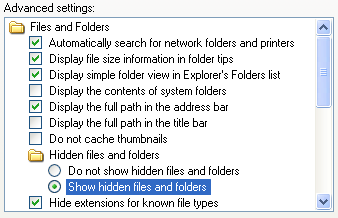
Follow the given steps to visible the hidden files and folders:
We need to edit the computer registry, first you should log onto your computer with administrative rights.
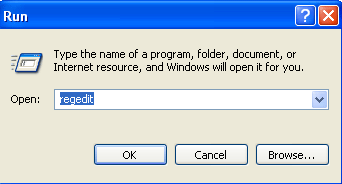
Click Start button and type regedit in Run option then press Enter for next.
Navigate to HKEY_LOCAL_MACHINE\Software\Microsoft\Windows\CurrentVersion\Explorer\
Advanced\Folde r\Hidden\SHOWALL
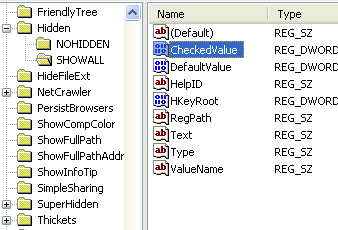
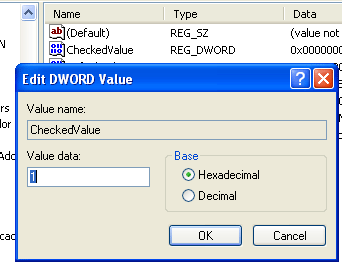
Now in right side panel, double click on the DWORD value �CheckedValue", here a small dialog box will appear with the title �Edit Dword Value".
To modify the �Value data" information as DWORD Value to 1 then click on Ok button to finish the process.
Now you can easily view the hidden files and folders using the path, Tool>Folder Options>View and then check �Show hidden files and folders" radio box.
But next time, if you want to disable this functionality then simply change the value of data box to old value.
PLEASE POST YOUR COMMENTS !!
And here is a Solution For it..

Follow the given steps to visible the hidden files and folders:
We need to edit the computer registry, first you should log onto your computer with administrative rights.
Click Start button and type regedit in Run option then press Enter for next.

Navigate to HKEY_LOCAL_MACHINE\Software\Microsoft\Windows\CurrentVersion\Explorer\
Advanced\Folde r\Hidden\SHOWALL

Now in right side panel, double click on the DWORD value �CheckedValue", here a small dialog box will appear with the title �Edit Dword Value".
To modify the �Value data" information as DWORD Value to 1 then click on Ok button to finish the process.

Now you can easily view the hidden files and folders using the path, Tool>Folder Options>View and then check �Show hidden files and folders" radio box.
But next time, if you want to disable this functionality then simply change the value of data box to old value.
PLEASE POST YOUR COMMENTS !!
How to display the top secret of Sony Ericsson mobile phones?
This tip will helps you to reveal the secret codes of Sony Ericsson mobile phones. These codes will work on most of the latest Sony Ericsson mobile sets. You can display the hidden information of mobile sets and then troubleshoot the routine problems using these codes.
Sony Ericsson Useful Secret Codes
Code____Action
0# --- To display the last dial number
*#06# --- To display the IMEI Number of the mobile
-> * <- <- * <- * --- Use to display the secret menu of Sony mobile
<**< --- Use to display the information about mobile network
< 0 0 0 0 > --- Use to reset Sony Ericsson mobile default language
>*<<*<* --- Use to display the mobile software version
<0000> --- Use to reset Sony Ericsson mobile default theme
# --- To display the SIM Number of the mobile
**04*0000*0000*0000# --- You can access you mobile settings without SIM card
*#0000# --- Use to reset Sony Ericsson mobile English menu
904060 + > --- Use to reset mobile phone settings
904093 + menu --- Use to display the CDMA Mode
On/off button --- Press and release quickly on/off button to verify the battery status.
> * > (>); --- To display the text contained in the phone
PLEASE POST YOUR COMMENTS
Sony Ericsson Useful Secret Codes
Code____Action
0# --- To display the last dial number
*#06# --- To display the IMEI Number of the mobile
-> * <- <- * <- * --- Use to display the secret menu of Sony mobile
<**< --- Use to display the information about mobile network
< 0 0 0 0 > --- Use to reset Sony Ericsson mobile default language
>*<<*<* --- Use to display the mobile software version
<0000> --- Use to reset Sony Ericsson mobile default theme
# --- To display the SIM Number of the mobile
**04*0000*0000*0000# --- You can access you mobile settings without SIM card
*#0000# --- Use to reset Sony Ericsson mobile English menu
904060 + > --- Use to reset mobile phone settings
904093 + menu --- Use to display the CDMA Mode
On/off button --- Press and release quickly on/off button to verify the battery status.
> * > (>); --- To display the text contained in the phone
PLEASE POST YOUR COMMENTS
How to play with your Motorola mobile secret features?
This tip will help you to play with your Motorola mobile secret features. These codes may be not applied to all models Motorola handsets, but you can try to configure all latest Motorola mobiles. You can display the hidden information of mobile sets and troubleshoot the routine problems using these codes.
Follow the list of latest Motorola mobile secret list:
Code________Action
*7 --- Use to lock/unlock the mobile keys
19980722 --- Work as “Master key” to unlock the Motorola sets
*#06# --- To display the IMEI Number of the mobile
*#403# --- Press keys to get information about mobile manufacturing
*#301# --- Use to test the functions of the keys
*#303# --- Use to reset default language to English
*#300# --- Use to display the mobile software/hardware version
*#311 --- Use to reset the default code of mobile
*#402# --- Use to regulate the mobile display strength/intensity
*#304# --- Press keys to OFF the engineering mode
*#304*19980722# --- Press keys to ON the engineering mode
*#0000# --- Use to reset Motorola mobile default language
1234 --- Default Motorola mobile code
32*279*1*0*8 --- Use to verify the mobile model
#PROGRAM# --- Use to change the default banner of mobile
##33284 --- Use to run mobile in Debug mode
#02#* --- Use to display the mobile software version
*#42253646633# --- Use to enable COM port
*#987*99# --- Use to restore the Motorola factory settings
#32# --- Reset the mobile timers
###119#1# --- Use to make active the EFR mode for mobile
###119#0# --- Use to make deactivate the EFR mode for mobile.
PLEASE POST YOUR COMMENTS!!
Follow the list of latest Motorola mobile secret list:
Code________Action
*7 --- Use to lock/unlock the mobile keys
19980722 --- Work as “Master key” to unlock the Motorola sets
*#06# --- To display the IMEI Number of the mobile
*#403# --- Press keys to get information about mobile manufacturing
*#301# --- Use to test the functions of the keys
*#303# --- Use to reset default language to English
*#300# --- Use to display the mobile software/hardware version
*#311 --- Use to reset the default code of mobile
*#402# --- Use to regulate the mobile display strength/intensity
*#304# --- Press keys to OFF the engineering mode
*#304*19980722# --- Press keys to ON the engineering mode
*#0000# --- Use to reset Motorola mobile default language
1234 --- Default Motorola mobile code
32*279*1*0*8 --- Use to verify the mobile model
#PROGRAM# --- Use to change the default banner of mobile
##33284 --- Use to run mobile in Debug mode
#02#* --- Use to display the mobile software version
*#42253646633# --- Use to enable COM port
*#987*99# --- Use to restore the Motorola factory settings
#32# --- Reset the mobile timers
###119#1# --- Use to make active the EFR mode for mobile
###119#0# --- Use to make deactivate the EFR mode for mobile.
PLEASE POST YOUR COMMENTS!!
How to hide computer drives in windows XP?
This tip is very useful for home users, particularly for those who wants to hide/secure there important data from other users. You can hide any specific local drive or all drives (physical and removable) of the system and network drives also. By disabling the display of drives, you can safe your personal data from non-technical users on a single computer.
Follow the given steps to change the system drives registry value:
To use this feature, you will need to be logged into your computer with administrative rights.
Click Start button and type regedit in Run option then press Enter for next.

Here locate the location to:
HKEY_CURRENT_USER\Software\Microsoft\Windows\CurrentVersion \Policies\Explorer

Here in right side panel, right click to create a new DWORD value with name
NoDrives (it is case sensitive), then assign number to its value data box.

Now if you want to hide all system drives then modify value data to 3FFFFFF.

For specific drive use values (For example, for A, B, C, D, E, F, G, H drives,
the values are 1, 2, 4, 8, 16, 32, 64, and 128 respectively).
In this case we are trying to hide F drive, so we modify the value data box to 32.

Now close the registry editor and restart your computer after any changes to go into effect.
But next time, if you want to unhide this drive then simply change the value data box or delete the DWORD item.
Again close the registry editor and restart your computer after any changes to go into effect.
Follow the given steps to change the system drives registry value:
To use this feature, you will need to be logged into your computer with administrative rights.
Click Start button and type regedit in Run option then press Enter for next.

Here locate the location to:
HKEY_CURRENT_USER\Software\Microsoft\Windows\CurrentVersion \Policies\Explorer

Here in right side panel, right click to create a new DWORD value with name
NoDrives (it is case sensitive), then assign number to its value data box.

Now if you want to hide all system drives then modify value data to 3FFFFFF.

For specific drive use values (For example, for A, B, C, D, E, F, G, H drives,
the values are 1, 2, 4, 8, 16, 32, 64, and 128 respectively).
In this case we are trying to hide F drive, so we modify the value data box to 32.

Now close the registry editor and restart your computer after any changes to go into effect.
But next time, if you want to unhide this drive then simply change the value data box or delete the DWORD item.
Again close the registry editor and restart your computer after any changes to go into effect.