Search This Blog

Showing posts with label Trojans. Show all posts

Manual Removal of W32/VB.KIE Trojan

Manual Removal of W32/Rbot.WIM Trojan.
W32/VB.KIE is a trojan. The trojan will infect Windows systems.
This trojan first appeared on February 2, 2009
Other names of W32/VB.KIE Trojan:
This trojan is also known as Trojan-Downloader.Win32.VB.kie
Damage Level : High/Medium
Distribution Level: Unknown
No Auto Removal Tool for W32/VB.KIE Trojan
W32/VB.KIE Trojan Manual Removal Instructions

Recommend Removal from Safe Mode:

How to Start in Safe mode:
Restart your Computer, Press F8 Repeatedly, when your Screen turns on, Select Safe mode, press enter.
The Infected Files Can be Seen in these folders and names also Running in Tasks
End the Following Active Process Before Removal
Download W32/VB.KIE Trojan Known Files Removal Tool
[In Windows Vista Run As Administrator, After Execution System Will Restart]
  • %Windows\System32\s3mgr.exe

    If you have any of these files in running process from task manger, end the process before removal.
    Note: if task manager is disabled
    Download the following file [ Right click and select "Save Target as" ]
    Click to Download - Enable Registry.reg
    Open it with Regedit.exe [%system32\regedit.exe], then it Confirms Add to registry Yes or No, Confirm Yes, then click Ok.
W32/Rbot.WIM Trojan Entries Manual Removal From Registry
Click Start, Run,Type regedit,Click OK.
Note: If the registry editor fails to open the threat may have modified the registry to prevent access to the registry editor.
Download UnHookExec.inf, [ Right click and select "Save Target as" ] and then continue with the removal.
Save it to your Windows desktop. Do not run it at this time, download it only.
After booting into the Safe Mode or VGA Mode
Right-click the UnHookExec.inf file and click Install. [This is a small file. It does not display any notice or boxes when you run it.]

HKEY_LOCAL_MACHINE\SOFTWARE\Microsoft\Windows\CurrentVersion\Run
Delete the S3mgr Entry on the right pane


Search Registry For W32/Rbot.WIM Trojan File Names listed above to remove completely,
Edit Menu - Find
, enter Keyword and remove all value that find in search.

Exit the Registry Editor,
Restart your Computer.

Recommended Removal Tools:
Killbox (Freeware)

Manual Removal of ExpressAntiVirus2009 Trojan

Manual Removal of ExpressAntiVirus2009 Trojan.
ExpressAntiVirus2009 is a misleading application that may give exaggerated reports of threats on the computer.
Publisher: ExpressAntiVirus2009.com
Damage Level : Medium
Distribution Level: Low
Trojan Worm Manual Removal Instructions
Recommend Removal from Safe Mode:

How to Start in Safe mode:
Restart your Computer, Press F8 Repeatedly, when your Screen turns on, Select Safe mode, press enter.
The Infected Files Can be Seen in these folders and names also Running in Tasks
End the Following Active Process Before Removal

  • %ProgramFiles\exav\av.ini
  • %ProgramFiles\exav\base.dll
  • %ProgramFiles\exav\borlndmm.dll
  • %ProgramFiles\exav\expressav.exe [ Kill the Process, Use Killbox if your Access Denied ]
  • %Documents and Settings\[User Name]\Application Data\Local settings\Temp
    • If you have any of these files in running process from task manger, end the process before removal.
    • Note: if task manager is disabled, Download the following file, Click to Download - Enable Registry.reg
    • Open it with Regedit.exe [%system32\regedit.exe], then it Confirms Add to registry Yes or No, Confirm Yes, then click Ok.


Unregister DLL Files Using Windows Command Prompt
  • To open the Windows Command Prompt, go to Start > Run > type cmd and then click the "OK" button.
  • Type "cd" in order to change the current directory,
  • Press the "space" button, enter the full path to where you believe the System Antivirus 2008 DLL file is located press the "Enter" button on your keyboard.
  • If you don't know where System Antivirus 2008 DLL file is located, use the "dir" command to display the directory's contents.
  • To unregister "System Antivirus 2008" DLL file,
  • Type in the exact directory path + "regsvr32 /u" + [DLL_NAME]
  • (C:\Windows\System\ regsvr32 /u lsasrv.dll) and press the "Enter" button.
  • A message will pop up that says you successfully unregistered the file.
Trojan Manual Removal From Registry
Click Start, Run,Type regedit,Click OK.
  • Note: If the registry editor fails to open the threat may have modified the registry to prevent access to the registry editor.
    • Download and run this UnHookExec.inf, and then continue with the removal.
    • Save it to your Windows desktop. Do not run it at this time, download it only.
    • After booting into the Safe Mode or VGA Mode
    • Right-click the UnHookExec.inf file and click Install. [This is a small file. It does not display any notice or boxes when you run it.]
The Trojan modifies registry at the following locations to ensure its automatic execution at every system startup:

HKEY_LOCAL_MACHINE\SOFTWARE\Microsoft\Windows\CurrentVersion\Run\"av" = "C:\Program Files\exav\expressav.exe"
It also modifies the following registry entries:
HKEY_CURRENT_USER\Software\Microsoft\Windows\CurrentVersion\Policies\Explorer\"NoFind" = "1"
HKEY_CURRENT_USER\Software\Microsoft\Windows\CurrentVersion\Policies\Explorer\"NoRun" = "1"
HKEY_CURRENT_USER\Software\Microsoft\Windows\CurrentVersion\Policies\Explorer\"NoSMHelp" = "1"
HKEY_CURRENT_USER\Software\Microsoft\Windows\CurrentVersion\Policies\Explorer\"NoSetFolders" = "1"
HKEY_CURRENT_USER\Software\Microsoft\Windows\CurrentVersion\Policies\Explorer\"NoViewOnDrive" = "3FFFFFF"
HKEY_CURRENT_USER\Software\Microsoft\Windows\CurrentVersion\Policies\System\"DisableRegistryTools" = "1"
HKEY_CURRENT_USER\Software\Microsoft\Windows\CurrentVersion\Policies\System\"DisableTaskMgr" = "1"
HKEY_CURRENT_USER\Software\Policies\Microsoft\Internet Explorer\Restrictions\"NoBrowserOptions" = "1"

1 = On, 0 = Off


Search Registry For Virus File Names listed above to remove completely,
Edit Menu - Find
, enter Keyword and remove all value that find in search.

Exit the Registry Editor,
Restart your Computer.

Recommended Removal Tools:
Killbox (Freeware)

How to Clean and Remove Trojan.Win32.Obfuscated.gx, Trojan.Win32.agent.akk, Trojan.Zlob and more.

The system constantly prompts a “Critical System Error!” pop up message saying “Your browser was infected by Trojan.Win32.Obfuscated.gx. You need to clean your system immediately, in other case it can be crashed soon! Click OK to download the high-tech antispyware protection software! (Recommended).” The pop up appears randomly, such as when opening a URL using IE, clicking on a link on web page or clicking on a file item in Windows Explorer.

If users ‘infected’ click on OK button to download the high-tech antispyware remover, an executable with file name as defender-install.exe will be offered. Beside, the Google, Yahoo! and Windows Live search results may also be hijacked where clicking on links in search results will direct users to incorrect and misleading websites rather than intended sites. Worse of all, the infection warning message may appear in the search results page too.

Trojan.Win32.Obfuscated.gx (can also be known as Trojan.Win32, Trojan.Win32.agent.akk, Trojan.Zlob, Trojan.Zlob-X.a, Trojan.Win32.LinkReplacer, Trojan.Win32.StarField, Trojan.Win32.Startpage.fq, Trojan.Agent, Trojan.Win32.Gorshok.a, Worm.Win32.Sober, Trojan.Vundo, Trojan.KillAV, Trojan.Win32.Patched, Trojan.Win32.CP4000, Trojan Win32/Qoologic, Trojan Win32.Murlo and other unknown trojan) is in essence not a virus by itself, instead is a malicious trick by new rogue anti-spyware program such as IE Defender or Files Secure to con users by displaying one of the Trojan listed above as their scan results in fake system security alerts, to mislead and trick users into downloading and subsequently paying to buy the rogue antispyware program just to simply remove the Trojan that they planted on users’ computer themselves.


The Trojan.Win32.Obfuscated.gx Trojan or the malware can infect a computer through installing a fake video codec which is asked to install when playing video, usually adult contents and sexually explicit videos downloaded from P2P sharing sites or torrents, such as the infamous Edison Chen sex photos scandal.

There are various way to safely remove Trojan.Win32.Obfuscated.gx, Trojan.Win32, Trojan.Win32.agent.akk or Trojan.Zlob. Most new antivirus and anti-spyware programs updated with latest signature should be able to detect and delete and Trojan horse. If your anti-virus program doesn’t do its job properly, here’s the manual removal instruction to clean and remove trace of Trojan.Win32.Obfuscated.gx from your system safely and easily.
  1. Click on the Start Menu button, then click on the Control Panel option, and then double-click on the Add or Remove Programs icon or Uninstall a program link.
  2. Locate Trojan.Win32.Obfuscated.gx (or its related variant name) and double-click on it to uninstall the Trojan. Follow the step-by-step on screen instructions to complete uninstallation of the Trojan. If the Trojan.Win32.Obfuscated.gx is not found as one of the uninstallation item, step to step 5.
  3. Restart the computer when prompted.
  4. System will continue uninstalling the Trojan. When uninstallation completed, exit “Add or Remove Programs” and “Control Panel” or “Programs and Features” folder.
  5. Close all programs, especially Internet Explorer and Windows Explorer.
  6. Run Registry Editor (regedit.exe), and then search and delete all of the following infected entries in registry:

    7d4b39e4cab018496e2fe9bf9c3234b2
    69c9be662f7f284aae171adeb136cb24
    1bc5752bd72f44f004d9f061dd7f9e00
    bcf3a381bbe26d9c1ec24bac8b18f567
    8266c79a434aed795a5f3f7abb0aff0d
    696ce23305a35bb118afc42d58845791
    2982068d063848ddb0b8029750411a84
    fe6e6a62a572e84e9eaee12eb3ee8a2b
    1057a2dcd13130963be0a51c41dc4d1c
    396955766b2e512bc3545a24bc485dbe
    5f9523529ce2cac480acbda2b8bf4e1e
    7df5417b22988d88e8080a44392ade95
    cbdc7b3033e82c2065a1b48061b2ca01
    6d3c4dbecf4aaf1ae826a0a7edde5951
    e05997f932f826f0271cf32d00bbd3be
    c18c3b4771120703624baaf835feecd8
    9ceecf911241c9890541167edf53739f
    40613dee6ad5fec910606c25b25262fd
    3ba096caa45ab117721e725079cc53a1
    bb5be1c92c299a1c6bcfe67655b0a0c7
    9a9f57899a28547b04fc2da3700c95cf
    7a329404de21925daacbbbee093ff6dc

  7. Open Task Manager (taskmgr.exe) and terminate any Trojan.Win32.Obfuscated.gx (or its variant) process.

  8. Find and locate the path to the following Trojan infected files. Unregister these DLLs with command below at command prompt, and then rename the infected DLL files as BADFILE1.DLL, BADFILE2.DLL, BADFILE3.DLL and so on: Command to unregister DLL

    (Run the command in the folder which contain the DLL by using “cd” to change directory):

    regsvr32 /u FILENAME.dll
    (FILENAME is the name of the file that you want to unregister listed below)

    Trojan infect DLLs:
    mlljh.dll
    ibpmxtbv.dll
    ljjhedc.dll
    cabvie.dll
    windivx.dll
    ddayv.dll
    vkcxxfvi.dll
    ssqpo.dll
    stream32a.dll
    vipextqtr.dll
    ecxwp.dll
    gebca.dll
    ddcdedd.dll
    advpac.dll
    tdlRMS.dll
    lcxmehhg.dll
    hdbxuqje.dll
    mljge.dll
    ddcbyvt.dll
    advrepkon.dll
    ddccd.dll
    sgqddvym.dll
    pofwjina.dll
    bkfgnqhm.dll
    orkbobob.dll
    tuvttrr.dll
    cpwvehup.dll
    enhtb.dll

    Note: If you unable to delete or rename the files, try to restart computer in and boot in safe mode to try again.

  9. Go to C:\Program Files\ folder and delete the “IE Defender” folder, if found.

    Note: If you unable to rename the files, try to restart computer in and boot in safe mode to try again.

  10. Restart computer.

  11. If no problem exists, delete all “BADFILE*.DLL” which renamed from infected DLLs.

  12. If IE homepage has been changed or hijacked, go to Start -> Control Panel -> Internet Options, click on the General tab, and then click Use Default under Home Page. Type in the new desired default homepage, then click Apply or OK button. Open a new web browser to check that IE displays the desired default homepage.

  13. To remove Trojan.Win32.Obfuscated.gx or its variant icons from the Desktop, simply delete them or drag and drop thems to the Recycle Bin.
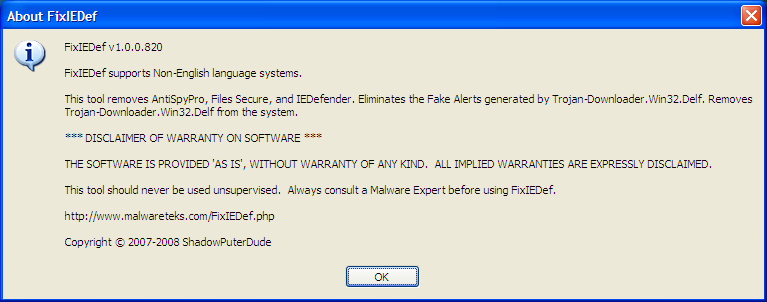
Trojan.Win32.Obfuscated.gx is now completely removed and cleaned from the system. If you prefer a more automated way to delete the virus, use SmithfraudFix or follow guide below to use FixIEDef that specifically removes AntiSpyPro, Files Secure, and IEDefender and thus eliminates the “Fake Alerts” generated by Trojan-Downloader.Win32.Delf. FixIEDef also removes Trojan-Downloader.Win32.Delf from the system.
  1. Download FixIEDef.exe by ShadowPuterDude to the Desktop.

    Note that FixIEDef.exe must be saved to desktop or it may not work properly

  2. Double-click FixIEDef on desktop.
    FixIEDef
  3. Click OK.
    FixIEDef
  4. Click Scan! to start scanning the system for trace of Trojan.Win32.Obfuscated.gx and related Trojans.
    FixIEDef
  5. Click OK.
    FixIEDef
  6. Wait for the scanning process to finish. Both file system and registry will be scanned.
    FixIEDef Scan

    Note that FixIEDef will kill all copies of Internet Explorer and Explorer that are running, during removal of malicious files. The icons and Start Menu on your Desktop will not be visible while FixIEDef is removing malicious files. This is necessary to remove parts of the infection that would otherwise not be removed.
  7. Click Exit once FixIEDef displays the “All Finished” message. FixIEDef
  8. All FixIEDef log will be posted on the desktop. Review the content of the log if needed.

What is krn132.exe? How to Remove?

krn132.exe is a dangerous virus that clears your hard disk.

The technical name for krn132.2x2 is Klez Trojan.
Klez Trojan is a trojan spread by mostly email, that in lots of cases, has actually removed all files on the infected computer


When [ W32.Klez.A | at | mm ] is executed, it does the following:

It copies itself to

%System%\Krnl132.exe

NOTE: %System% is a variable. The worm locates the \Windows\System folder (by default this is C:\Windows\System or C:\Winnt\System32) and copies itself to that location.

It adds the value

krn132 %System%\krn132.exe

to the registry key

HKEY_LOCAL_MACHINE\Software\Microsoft\
Windows\CurrentVersion\Run

so that it is executed when you start Windows.

The worm attempts to disable on-access virus scanners and searches local, mapped, and network drives. The worm copies itself using a random file name with a variable double extension, such as Filename.txt.exe.

In addition, the worm searches the Windows address book, which is used by Microsoft Outlook, for email addresses. The worm sends an email message to these addresses with itself as an attachment.

The email message has the following characteristics:

Subject: The subject of the email varies. It will usually be one of the following:
How are you?
Can you help me?
We want peace
Where will you go?
Congratulations!!!
Don't cry
Look at the pretty
Some advice on your shortcoming
Free XXX Pictures
A free hot porn site
Why don't you reply to me?
How about have dinner with me together?
Never kiss a stranger


Attachment: The attachment has a random file name with the .exe extension.
Message:
I'm sorry to do so,but it's helpless to say sorry.
I want a good job,I must support my parents.
Now you have seen my technical capabilities.
How much my year-salary now? NO more than $5,500.
What do you think of this fact?
Don't call my names,I have no hostility.
Can you help me?


This message may not be visible (this depends on the ability of the email client to display HTML email messages). If the message is received by Microsoft Outlook or Outlook Express, the attachment may be automatically executed. Information about this vulnerability and a patch are available at
http://www.microsoft.com/technet/security/bulletin/MS01-020.asp

Every other month starting in January (January, March, May, and so on), if the date is the 13th of the month, the payload is executed. This causes files on local and mapped drives to become zero bytes in length.

Removal

  1. (Only needed if you are not successfull in the normal mode) Restart in safe mode (Tip: As soon as you restart the computer press F8 before the windows screen appears. Select Safe mode)
  2. Search for the file krn132.exe and delete it.
  3. Delete the cookie named xww
  4. Delete the following registry values
  5. Go to your registry (start-->run-->enter regedit-->press OK)
  6. Search for krn132 (press ctrl+F and enter krn132)
  7. Delete where ever you find it.

Points to ponder

Is it really worth your time and money (you could lose all your money in the bank if your password is compromised) to be worrying about these things?

It is always better to have a software that can protect your computer and you. Spywares are more dangerous than viruses, coz of the simple reason that they steal your information. Your banking account password is much more worthy to them than your computer. And thats what most of them are after.

Know About Vundo Trojan

Vundo is a particularly frustrating Trojan horse that causes popups and now and again causes flaws to the computer system by blocking the access to some websites like Google. The Trojan resides in the memory through the Internet browser’s setup program.

On Window’s operating systems, the DLL Trojan files are labeled as eight random upper and lower case characters and reside in the system32 directory. This will create hidden files, which will be located during a virus scanning process, instead of the DLL file itself.
How to remove a Vundo Trojan

There are several ways to get rid of the Vundo Trojan from your system
Manually

Step 1: Locate the Trojan

1. Open the “Start” menu and choose the “Search” option from the list.
2. Check the option “All files or folders” and in the section “All part or part of the file name”, enter “Vundo” in the field file name.
3. Set the option to search through your local drives or in the whole computer system by selcting “Look in: Local Hard Drives” or “Look in: My Computer”
4. Begin the process by clicking “Search”.
5. When the process is done, select the “Vundo” folder found and copy the path into the address bar. You should also save the same path on your clipboard as you will use it to delete the Vundo.
Step 2: Use Registry Editor to eliminate Registry Values

1. Open the Start menu and go to the “Run” option and enter “regedit” and click “OK”
2. Locate and remove the spywares that were searched earlier.
3. To remove the "Vundo" value, right-click and choose the "Delete" option from the list.
4. Browse for and delete "Vundo" registry entries:

HKEY_CURRENT_USERSoftwareMicrosoftInternetExplorerMainActiveState
02F96FB7-8AF6-439B-B7BA-2F952F9E4800

HKEY_LOCAL_MACHINESOFTWAREClassesATLEvents.ATLEvents.1

HKEY_LOCAL_MACHINESOFTWAREClassesATLEvents.ATLEvents
8109AF33-6949-4833-8881-43DCC232B7B2
2316230A-C89C-4BCC-95C2-66659AC7A775

HKEY_LOCAL_MACHINESoftwareMicrosoftWindowsCurrentVersionRunOnce*[filename]

HKEY_CURRENT_USER SoftwareMicrosoftInternet ExplorerMainActive StateHKEY_CURRENT_USERSoftwareMicrosoftWindowsCurrentVersionRunOnce*WinLogon

HKEY_LOCAL_MACHINE SOFTWAREMicrosoftWindows CurrentVersionExplorerBrowser Helper Objects{8109AF33-6949-4833-8881-43DCC232B7B2}

HKEY_LOCAL_MACHINE SOFTWAREMicrosoftWindows CurrentVersionExplorerBrowser Helper Objects{2316230A-C89C-4BCC-95C2-66659AC7A775}

HKEY_LOCAL_MACHINE SOFTWAREMicrosoftWindows CurrentVersionExplorerBrowser Helper Objects{02F96FB7-8AF6-439B-B7BA-2F952F9E4800}

HKEY_LOCAL_MACHINE SOFTWAREClassesCLSID{02F96FB7-8AF6-439B-B7BA-2F952F9E4800}

HKEY_LOCAL_MACHINE SOFTWAREClassesATLEvents.ATLEvents.1

HKEY_LOCAL_MACHINE SOFTWAREClassesATLEvents.ATLEvents

HKEY_CLASSES_ROOTCLSID{8109AF33-6949-4833-8881-43DCC232B7B2}

HKEY_CLASSES_ROOTCLSID{2316230A-C89C-4BCC-95C2-66659AC7A775}

HKEY_LOCAL_MACHINE SoftwareMicrosoftWindows CurrentVersionRunOnce*[filename]

HKEY_CURRENT_USER SoftwareMicrosoftWindows CurrentVersionRunOnce*WinLogon

Step 3: Using Command Prompt for Vundo unregistration

1. Go to the Start Menu and open the Run command.
2. Enter “cmd” and click “OK”
3. Enter “cd” to change the actual directory, leave a blank space and copy the Vundo DLL path saved and press the “Enter” key.
4. For unregistration, paste in the path directory together with "regsvr32 /u" + [DLL_NAME]” and press “Enter”

Download and Use at Your own Risk
Download “Vundo” Trojan Romover Software

Remove Vundo Trojan with Windows Defender
Download Windows Defender from Microsoft

Computer Threats Top 10

The nature of computer crime has changed over the years as the technology has changed and the opportunities for crime have changed. Although thrill-seeking adolescent hackers are still common, the field is increasingly dominated by professionals who steal information for sale and disgruntled employees who damage systems or steal information for revenge or profit.

1. Number of password-Stealing Web sites will increase using fake sign-in pages for popular online services

More attacks that attempt to capture a user's ID and password by displaying a fake sign-in page, and increased targeting of popular online services will become more evident in 2007. As evidenced by the phishing attacks that followed natural calamities last year, McAfee Avert Labs also expects more attacks that take advantage of people's willingness to help others in need.

In contrast, the number of attacks on ISPs are expected to decline, while those aimed at the financial sector will remain steady.

2. Volume of spam, particularly bandwidth-eating image spam, will rise

In November 2006, image spam accounted for up to 40 per cent of the total spam received, compared to less than 10 per cent a year ago. Image spam has been significantly increasing for the last few months and various kinds of spam, typically pump-and-dump stocks, pharmacy and degree spam, are now sent as images rather than text.

Image spam is typically three times the size of text-based spam, so this represents a significant increase in the bandwidth used by spam messages.

3. Popularity of video sharing on the Web makes it inevitable that hackers will target MPEG files

The increasing use of video formats on social networking sites such as MySpace, YouTube and VideoCodeZone will attract malware writers seeking to damage a network. Unlike situations involving email attachments, most users will open media files without hesitation. Furthermore, as video is an easy-to-use format, functionality such as padding, pop-up ads and URL redirects become ideal tools of destruction for malware writers.

The W32/Realor worm, discovered in early November 2006 by McAfee, is a recent incident of media malware. The worm could launch malicious Web sites without user prompting, potentially exposing users to bots or password-stealers loaded onto these sites. Other media malware such as Exploit-WinAmpPLS could silently install spyware with very little user interaction.

4. Mobile phone attacks will become more prevalent as mobile devices become smarter

Mobile threats will continue to grow as platform convergence continues. The use of smartphone technology has played a pivotal role in the threat's transition from multifunction, semi-stationary PCs to palm-sized 'wearable' devices. With increased connectivity through BlueTooth, SMS, instant messaging, email, WiFi, USB, audio, video and Web, there are more possibilities for cross device contamination.

2006 saw efforts by mobile malware authors to achieve PC-to-phone and phone-to-PC infection vectors. SMiShing, which involves taking the techniques of phishing by email and porting them to SMS (SMiShing instead of phishing), is also expected to increase in prevalence.

In addition, for-profit mobile malware is expected to increase in 2007. Late 2006 saw a flurry of spy-ware offerings in the mobile world. Most are designed to monitor phone-numbers and SMS call-logs, or to steal SMS messages by forwarding copies to another phone.

One spyware in particular, SymbOS/Flexispy.B, is able to remotely activate the microphone of the victim's device, allowing someone to eavesdrop upon that person. Other spyware can activate the camera. McAfee expects that the offerings of commercial spyware targeting mobile devices to grow in 2007.

5. Adware will go mainstream

In 2006, McAfee saw an increase in commercial Potentially Unwanted Programmes (PUPs), and an even larger increase in related types of malicious Trojans, particularly keyloggers, password-stealers, bots and backdoors. In addition, misuse of commercial software by malware with remotely controlled deployment of adware, keyloggers and remote control software is on the rise.

However, despite the social, legal and technical challenges, there is so much commercial interest in advertising revenue models that McAfee expects to see more legitimate companies using or attempting to use advertising software in ways (hopefully) less objectionable to consumers than most current adware.

6. Identity theft and data loss will continue to be a public issue

According to the US Federal Trade Commission, about 10 million Americans are victims of identity fraud each year. At the root of these crimes is often computer theft, loss of backups or compromised information systems. While McAfee expects the number of victims to remain relatively stable, company disclosures of lost or stolen data, increasing incidents of cyberthefts and hacking into retailer, processor and ATM systems and reports of stolen laptops that contain confidential data will continue to keep this topic of public concern.

McAfee also predicts the unauthorised transmission of information will become more of a risk for enterprises in the area of data loss and noncompliance. This includes loss of customer data, employee personal information and intellectual property from possible data leakage channels -- applications, networks, and even physical channels, like USB devices, printers, fax and removable storage.

7. The use of bots will increase as a tool favoured by hackers

Bots -- computer programmes that perform automated tasks -- are on the rise, but will move away from Internet Relay Chat (IRC)-based communication mechanisms and towards less obtrusive ones. In the last few years, there has been increasing interest within the virus-writing community in IRC threats. This was due to the power afforded by the IRC scripting language and the ease of coordinating infected machines from a chat-room type of structure.

'Mules' will also continue to be an important aspect in bot-related money making schemes. These are work-at-home type jobs which are offered through very professional-looking Web sites, through classified ads, and even through instant messaging (IM). These are a crucial part of the reason so many bots are able to be run from places around the globe. In order to get merchandise (often to resell) or cash with stolen credit card credentials, the thieves have to go through more strict regulations if the goods are going to another country. To get around these regulations, they use mules within those originating countries.

8. Parasitic malware, or viruses that modify existing files on a disk, will make a comeback

Even through parasitic malware accounts for less than 10 per cent of all malware (90 per cent of malware is static), it seems to be making a come back.

Parasitic infectors are viruses that modify existing files on a disk, injecting code into the file where it resides. When the user runs the infected file, the virus runs too. W32/Bacalid, W32/Polip and W32Detnat are three popular polymorphic parasitic file infectors identified in 2006 that have stealth capabilities and attempt to download Trojans from compromised Web sites.

Also important to note is that 80 per cent of all malware is packed, encrypted, or obfuscated, in some attempt to disguise its malicious purpose. Examples of parasitic infectors that are obfuscated include w32/Bacalid and w32/Polip.

9. The number of rootkits on 32-bit platforms will increase

Rootkits will increase on 32-bit platforms -- but protection and remediation capabilities will increase as well. On 64-bit platforms, particularly Vista, malware trends are difficult to predict pending uptake rates for the 64-bit platform, but in general McAfee expects:

A reduction in kernel-mode rootkits, at least in the short-term, while malware authors invent new techniques designed to subvert PatchGuard.

An increase in user-mode rootkits, and user-mode malware in general, or at least higher impact of 64-bit malware, as more advanced heuristic and behavioral techniques provided by most advanced security software is itself hindered by PatchGuard. This state will persist at least until Vista service pack 1, when new APIs are introduced by Microsoft, and likely longer, depending on the amount of re-engineering required by security vendors and the uptake rate of SP1.

10. Vulnerabilities will continue to cause concern fueled by the underground market for vulnerabilities

The number of disclosed vulnerabilities is expected to rise in 2007. Thus far in 2006, Microsoft has announced 140 vulnerabilities through its monthly patch programme. McAfee expects this number to grow due to the increased use of fuzzers, which allow for large scale testing of applications, and due to the bounty programme that rewards researchers for finding vulnerabilities. This year, Microsoft has already patched more critical vulnerabilities than in 2004 and 2005 combined. By September 2006, the combined 2004 and 2005 total of 62 critical vulnerabilities had already been surpassed.

How to Detect Spyware Programs

There are different levels of Spying. For example, Alexa, popular software owned by Amazon.com, would be called a “BackDoor Santa” it doesn’t actually log your keystrokes or take system snapshots but it does record some surfing activity. However, programs like Spector are very skilled at stealthily gathering information including passwords, surfing history, and even chat logs and e-mails. If you haven’t done so already take a moment to read the Introduction to Spyware and Malware located here.

Who is Spying your System? How to monitor your system and check for the signs of spy softwares.

1) Work Environment: Assume you are being monitored. Most workplaces have the right to do this so by default get used to the fact that someone is monitoring you. There are several ways employers can monitor employees. Some use activity logging software to see what programs are being accessed and for how long. Naturally many will use spy software programs also known as “snoop ware” or a key-logger to take snapshots and log all keystrokes. An employer may actually monitor internet traffic as it moves across an intranet.

2) Anti-Spy Programs: A popular way to find out if someone is spying on you. Anti-Spy programs look for signatures or traces that are specific to certain spy software. Some simply do text string scanning to find them, and others i.e. (X-Cleaner from Xblock) actually extract and attempt to remove the Spyware. Be careful of the ones that use only text string scanning. Text string scanning can give false positives and in some cases it actually it can accidentally target anti-spy software! You can try a free online scanner.

Anti-Spy software can be a double-edged sword! Many spies will actually buy anti-spy software to scan and check to make sure their Spyware is not being detected. There is a hidden arms race that rages between Spyware vendors and anti-spy companies.

3) System Resources: Poorly written spy software will almost always put a drag on system resources. Watch out for poor system resources, running out of memory, lots of hard disk activity or a screen that “flickers”. This is caused by some spy software programs as they take snapshots of the computer screen that requires system resources.

4) Machine Access: Watch for people trying to gain access to your machine. Many software programs that are designed for spying require physical access to the target machine.

5) Installation Monitors: Currently on the market are software programs that will log every installation that occurs on your machine. It is best to leave these hidden on the system. It is possible to catch the installation of many spies in this way.

6) Anti-Virus: Many anti-virus programs can catch prolific spy software because they are often classified as “Trojan Horses”. Keep spy software up to date and make sure it is running in the background. This might not protect you against from some spy software but it will let you know if any re purposed Trojan horses are installed. Keep in mind that Trojans like NetBus or DeepBO are also classified as spy software because they open up a system to outside connections. Don’t be lulled into a false sense of security because you have one installed. They are helpful but there is no such thing as 100% fool proof protection.

7) Personal Firewall: In today’s treacherous Internet it is very helpful to also run a personal firewall. Firewalls will alert you to both inbound and outbound activity. You can control what is allowed in and out of your system. Watch for suspicious programs you do not recognize trying to send data out of your system.

8) Downloading Smarts: Simply put use common sense when downloading and avoid sources you cannot trust. If you are someone who frequents “warez” or crack sites you will more than likely encounter a Trojan or virus.

9) Common Sense: Be careful about what you install on your system. Don’t run e-mail attachments and read the EULA (end user license agreement). Keep an up to date anti-spy package on your machine.

10) Spy Software: Ironically you can monitor for spy software by installing spy software on your system first! Since spy software can record all keystrokes it can monitor and record the installation of another spy software. Again this turns into a virtual arms race, but keep in mind that many spy programs are vulnerable to anti-spy attacks.

Related: Secure Computer

Virus Information W32/AutoIt.AA Trojan

W32/AutoIt.AA Trojan is the Top virus or trojan in the web now.

W32/AutoIt.AA is a Trojan. The Trojan will infect Windows systems.

Upon execution, the trojan drops the following files in the Windows System folder:

SSVICHOSST.exe
autorun.ini
setting.ini
nhatquanglan18.exe
SCVHSOT.exe
test1.exe

It also drops SSVICHOSST.exe in Windows folder.

The trojan schedules a task to execute SSVICHOSST.exe once in a week.

The trojan creates registry at the following location to load itself during each startup;

HKEY_USERS\S-1-5-21-606747145-602162358-682003330-1000\Software\Microsoft\Windows\CurrentVersion\Run

It also modifies registry at the following location to load itself along with explorer.exe.

HKEY_LOCAL_MACHINE\SOFTWARE\Microsoft\Windows NT\CurrentVersion\Winlogon\Shell

This trojan first appeared on Mar 14, 2008.

Other names of W32/AutoIt.AA Trojan:

This trojan is also known as Trojan-Downloader.Win32.AutoIt.aa, Win32.Sohanad.R, W32/Sohanat.CM.worm .

Check for the solution

Related:

Virus, Worms and Trojans

A destructive program that masquerades as a benign application. Unlike viruses, Trojan horses do not replicate themselves but they can be just as destructive. One of the most insidious types of Trojan horse is a program that claims to rid your computer of viruses but instead introduces viruses onto your computer.

The term comes from the a Greek story of the Trojan War, in which the Greeks give a giant wooden horse to their foes, the Trojans, ostensibly as a peace offering. But after the Trojans drag the horse inside their city walls, Greek soldiers sneak out of the horse's hollow belly and open the city gates, allowing their compatriots to pour in and capture Troy.

Trojan horses are broken down in classification based on how they breach systems and the damage they cause. The seven main types of Trojan horses are:
Remote Access Trojans
Data Sending Trojans
Destructive Trojans
Proxy Trojans
FTP Trojans
security software disabler Trojans
denial-of-service attack (DoS) Trojans

what is known as a Trojan horse is a destructive program disguised as a simple application or useful program. The program contains additional hidden code which allows the unauthorized collection, exploitation, falsification, or destruction of data. Though lumped in with viruses, it doesn't propagate itself like a virus does.

One of the worst kinds of Trojans is a program that claims to rid your computer of viruses but instead puts them on your computer. Another common type will open a security hole for a hacker to get into your system and do all kinds of nasty stuff

You can prevent getting a Trojan Horse by having up-to-date anti-virus software, not opening unsolicited attachments, and scanning freeware and shareware you download before you unzip.

A computer virus attaches itself to a program or file so it can spread from one computer to another, leaving infections as it travels. Much like human viruses, computer viruses can range in severity: Some viruses cause only mildly annoying effects while others can damage your hardware, software or files. Almost all viruses are attached to an executable file, which means the virus may exist on your computer but it cannot infect your computer unless you run or open the malicious program. It is important to note that a virus cannot be spread without a human action, (such as running an infected program) to keep it going. People continue the spread of a computer virus, mostly unknowingly, by sharing infecting files or sending e-mails with viruses as attachments in the e-mail.

A worm is similar to a virus by its design, and is considered to be a sub-class of a virus. Worms spread from computer to computer, but unlike a virus, it has the capability to travel without any help from a person. A worm takes advantage of file or information transport features on your system, which allows it to travel unaided. The biggest danger with a worm is its capability to replicate itself on your system, so rather than your computer sending out a single worm, it could send out hundreds or thousands of copies of itself, creating a huge devastating effect. One example would be for a worm to send a copy of itself to everyone listed in your e-mail address book. Then, the worm replicates and sends itself out to everyone listed in each of the receiver's address book, and the manifest continues on down the line. Due to the copying nature of a worm and its capability to travel across networks the end result in most cases is that the worm consumes too much system memory (or network bandwidth), causing Web servers, network servers and individual computers to stop responding. In more recent worm attacks such as the much-talked-about .Blaster Worm., the worm has been designed to tunnel into your system and allow malicious users to control your computer remotely. Key Terms To Understanding Computer Viruses:

Virus
A program or piece of code that is loaded onto your computer without your knowledge and runs against your wishes.

Trojan Horse
A destructive program that masquerades as a benign application. Unlike viruses, Trojan horses do not replicate themselves

Worm
A program or algorithm that replicates itself over a computer network and usually performs malicious actions

Blended threat
Blended threats combine the characteristics of viruses, worms, Trojan Horses, and malicious code with server and Internet vulnerabilities .

Antivirus program
A utility that searches a hard disk for viruses and removes any that are found.


A Trojan Horse is full of as much trickery as the mythological Trojan Horse it was named after. The Trojan Horse, at first glance will appear to be useful software but will actually do damage once installed or run on your computer. Those on the receiving end of a Trojan Horse are usually tricked into opening them because they appear to be receiving legitimate software or files from a legitimate source. When a Trojan is activated on your computer, the results can vary. Some Trojans are designed to be more annoying than malicious (like changing your desktop, adding silly active desktop icons) or they can cause serious damage by deleting files and destroying information on your system. Trojans are also known to create a backdoor on your computer that gives malicious users access to your system, possibly allowing confidential or personal information to be compromised. Unlike viruses and worms, Trojans do not reproduce by infecting other files nor do they self-replicate.

Added into the mix, we also have what is called a blended threat. A blended threat is a sophisticated attack that bundles some of the worst aspects of viruses, worms, Trojan horses and malicious code into one threat. Blended threats use server and Internet vulnerabilities to initiate, transmit and spread an attack. This combination of method and techniques means blended threats can spread quickly and cause widespread damage. Characteristics of blended threats include: causes harm, propagates by multiple methods, attacks from multiple points and exploits vulnerabilities.

To be considered a blended thread, the attack would normally serve to transport multiple attacks in one payload. For examplem it wouldn't just launch a DoS attack — it would also install a backdoor and damage a local system in one shot. Additionally, blended threats are designed to use multiple modes of transport. For example, a worm may travel through e-mail, but a single blended threat could use multiple routes such as e-mail, IRC and file-sharing sharing networks. The actual attack itself is also not limited to a specific act. For example, rather than a specific attack on predetermined .exe files, a blended thread could modify exe files, HTML files and registry keys at the same time — basically it can cause damage within several areas of your network at one time.

Blended threats are considered to be the worst risk to security since the inception of viruses, as most blended threats require no human intervention to propagate.

Combating Viruses, Worms and Trojan Horses

The first steps to protecting your computer are to ensure your operating system (OS) is up-to-date. This is essential if you are running a Microsoft Windows OS. Secondly, you should have anti-virus software installed on your system and ensure you download updates frequently to ensure your software has the latest fixes for new viruses, worms, and Trojan horses. Additionally, you want to make sure your anti-virus program has the capability to scan e-mail and files as they are downloaded from the Internet. This will help prevent malicious programs from even reaching your computer. You should also install a firewall as well.

A firewall is a system that prevents unauthorized use and access to your computer. A firewall can be either hardware or software. Hardware firewalls provide a strong degree of protection from most forms of attack coming from the outside world and can be purchased as a stand-alone product or in broadband routers. Unfortunately, when battling viruses, worms and Trojans, a hardware firewall may be less effective than a software firewall, as it could possibly ignore embedded worms in out going e-mails and see this as regular network traffic. For individual home users, the most popular firewall choice is a software firewall. A good software firewall will protect your computer from outside attempts to control or gain access your computer, and usually provides additional protection against the most common Trojan programs or e-mail worms. The downside to software firewalls is that they will only protect the computer they are installed on, not a network.

It is important to remember that on its own a firewall is not going to rid you of your computer virus problems, but when used in conjunction with regular operating system updates and a good anti-virus scanning software, it will add some extra security and protection for your computer or network.

What is a Virus? How it Affect your Systems?
A program or piece of code that is loaded onto your computer without your knowledge and runs against your wishes. Viruses can also replicate themselves. All computer viruses are manmade. A simple virus that can make a copy of itself over and over again is relatively easy to produce. Even such a simple virus is dangerous because it will quickly use all available memory and bring the system to a halt. An even more dangerous type of virus is one capable of transmitting itself across networks and bypassing security systems.

Related:


More Posts that you may be interested...